
This guide shows how to do it in a minute with PickFairly's team generator, how to handle numbers that don't divide evenly, which settings suit common situations, and when random groups are not the right tool.
How to split a group into random groups
- Open the team generator.
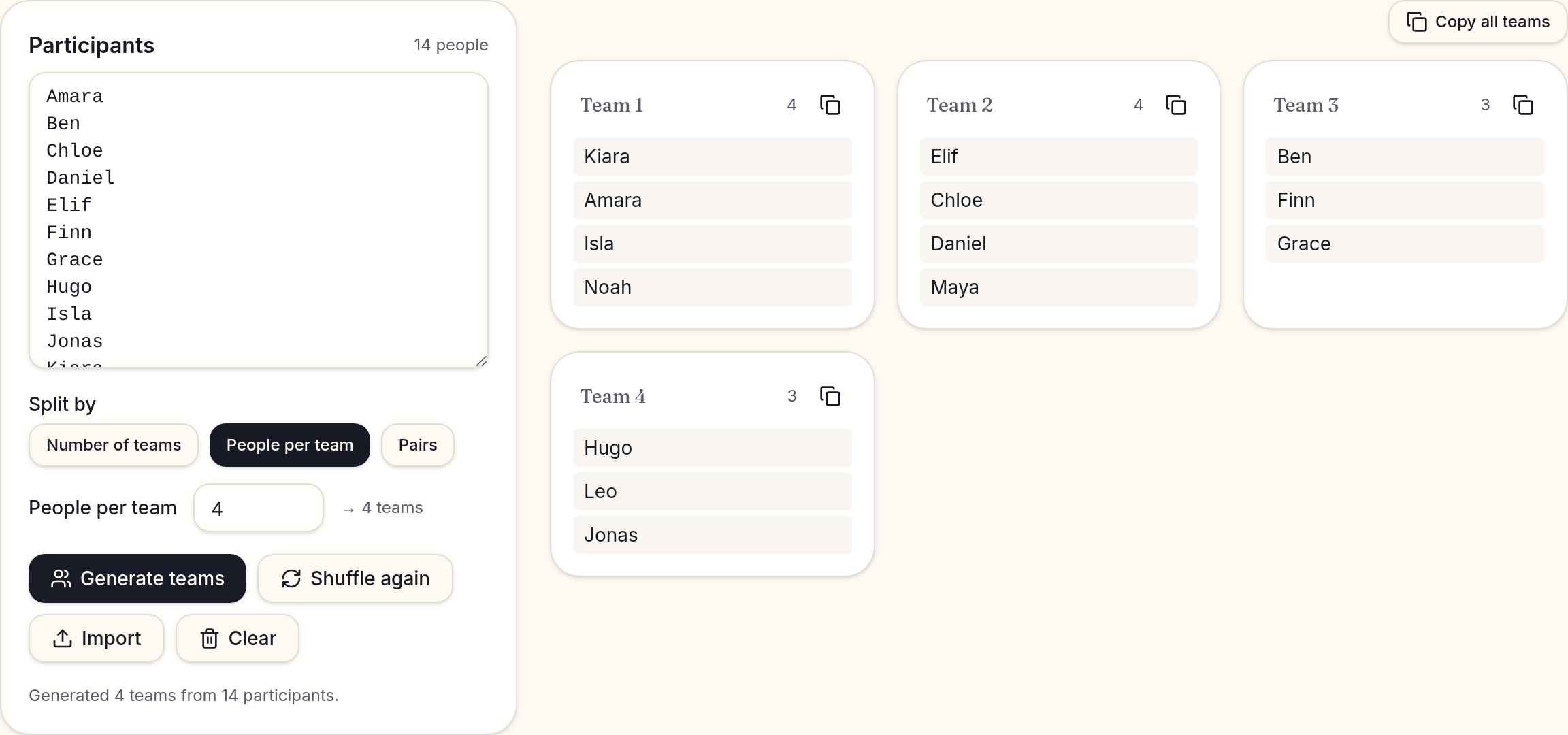
- Type or paste the names into Participants, one per line, or use Import to load them from a file or a spreadsheet column. Remove anyone who is absent first, so no group is short a person.
- Under Split by, choose Number of teams or People per team, then enter the number. Pairs is a shortcut for People per team set to 2.
- Press Generate teams and show the groups on the screen or projector, so everyone sees the same result at the same time.
- Press Copy all teams (or the copy button on a single team) and paste the groups into a document or message, with the date. Your list, settings and last result also stay saved in this browser.
- Next time, press Shuffle again for fresh groups instead of reusing the old ones.
Getting group sizes right
Most groups don't divide evenly, so decide what happens to the leftover people before you draw. The fair rule is that no group should be more than one person bigger than another.
| People | You want | Result |
|---|---|---|
| 23 | Groups of 4 | Five groups of 4 and one group of 3 |
| 26 | Groups of 4 | Five groups of 4 and two groups of 3 |
| 30 | 4 groups | Two groups of 8 and two groups of 7 |
| 15 | Pairs | Six pairs and one group of 3 |
Avoid a group of 1 or 2 when everyone else has 4: it's the most common mistake, and that small group gets a very different task. PickFairly's team generator does this automatically: team sizes never differ by more than one, and nobody is left on their own.
For problem-solving tasks, groups of three are a good default. In Peter Liljedahl's classroom research, three was the best group size from Grade 3 upwards: big enough to share ideas, small enough that nobody can hide.
Common situations, and the settings for each
| Situation | Group size | How often to reshuffle | Notes |
|---|---|---|---|
| Classroom group work | 3, or 2 to 4 | Every lesson or task | Generate on the projector, so students see nobody chose the groups |
| Lab or study partners | Pairs, one group of 3 if the number is odd | Every unit or topic | Short partnerships mean nobody is stuck with the same partner all term |
| Workshop or training breakouts | 4 to 6 | Every session | Mixes people from different teams or departments |
| PE or casual sports | Two or more equal teams | Every game | If the teams must be even in skill, see the section below |
| Longer projects | 3 to 5 | Once, at the start | Save the groups with the date, since they'll last weeks |
| Party or game night | 2 to 4 | Every round | Quick reshuffles keep the same friends from always teaming up |
In class, generating the groups where everyone can see them matters as much as the randomness itself. Teachers who use visibly random groups report that students accept the result more readily, because they can see that nobody chose the groups.
Other ways to make groups
| Method | Random? | The catch |
|---|---|---|
| Random team generator | Yes | Needs a screen everyone can see |
| Counting off (1, 2, 3, 4…) | Partly | People can change seats before the count to land with a friend |
| Drawing cards, sticks or coloured paper | Yes, if well shuffled | Slow to prepare, and hard to record |
| Students choose their own groups | No | The same groups form every time, and someone is always left out |
| Teacher or leader chooses | No | Can suit a specific goal, but people may suspect favouritism |
| Spreadsheet sorted by a random number | Yes | Re-sorts every time the sheet changes, so copy the result straight away |
Counting off is the most common shortcut, and it's better than self-chosen groups. But because people pick where they sit, it's only as random as the seating.
When random isn't enough
Random groups are fair in how they're chosen, but they don't promise balance. By chance, one group can get the three strongest players or the three quietest students, and with small groups this happens more often than people expect.
If balance matters, as in competitive sports or a graded project, use a balancing method instead, such as a snake draft or ability-based sorting. Our guide to random teams vs balanced teams compares the options with worked examples.
You can also keep random groups and add a simple rule, such as keeping two students apart who shouldn't work together. Apply the rule before you show the result, and tell the group that you used one. A rule people know about is fair; a quiet swap afterwards isn't.
Need a speaking order rather than groups? The list randomizer shuffles the same names into a running order, and our guide to random student selection covers picking one student at a time.
FAQ
Two friends ended up together again. Is the generator broken? Probably not. With 24 people in six groups of 4, any two people have a 3 in 23 chance (about 13%) of sharing a group in one draw. Over 10 draws, there's about a 75% chance they'll be together at least once.
How often should I reshuffle groups? For classroom tasks, every lesson or every new task works well. Frequent reshuffles mean everyone works with almost everyone over a term.
What if someone arrives late? Add them to the smallest group. If all groups are the same size, add them to any group, picked at random if anyone asks.
Should I choose the number of groups or the group size? Choose the group size when the task needs it, such as pairs for a dialogue or threes for problem solving. Choose the number of groups when you have a fixed number of tables, rooms or courts.
How do I show the groups were random? Generate them on a shared screen, in front of everyone. For anything that matters, take a screenshot or note the time of the draw.
Sources
- The affordances of using visibly random groups in a mathematics classroom (Peter Liljedahl, Simon Fraser University)
- Visibly random grouping applied to first-semester engineering (Ohio State University, ASEE)
- Building Thinking Classrooms in Mathematics, Grades K–12 (Peter Liljedahl, Corwin): source of the group-of-three finding
- Random teams vs balanced teams (PickFairly)
- Is an online wheel spinner really random? (PickFairly fairness test)
About the author
I’m Mujafet Osmani, founder of PickFairly, based in North Macedonia. I build easy-to-use online tools that solve everyday problems. I started PickFairly because I believe people deserve better tools than the ones that already exist, and that challenge is what drives me to keep improving it.